Podcast Episode

3 Soundtrap Projects Your Students Will Love

Listen to the podcast episode and subscribe below!

Subscribe to the Podcast in… Apple Podcasts | Overcast | Castro | Spotify | RSS

This is the first year that I have had consistent access to a cloud-based DAW and notation editor with all of my students. The result of this experience has been dozens of new Soundtrap project ideas. I plan to do an episode and post about how I am using these tools for composition projects in the band classroom later this year.

In the episode above, and in this post, I give an overview of three of my most successful Soundtrap projects this year. These projects can be done in any digital audio workstation, including Bandlab, GarageBand, Logic, Ableton Live, etc.

Listen to the episode for a more thorough explanation of each idea.

C Melody and Loop Audition
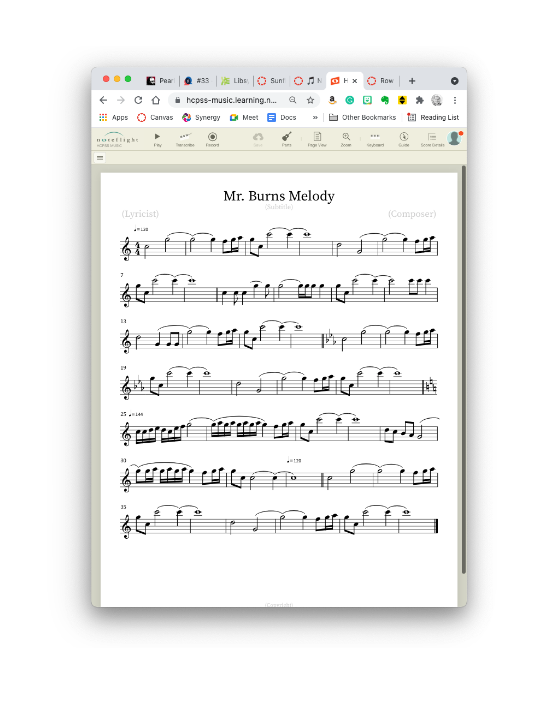
Melody writing in Noteflight and producing in Soundtrap go hand in hand. Because of Noteflight’s many export options, you have many ways to get your melody out of Noteflight and into your Soundtrap project.

Melody writing in Noteflight and producing in Soundtrap go hand in hand. Because of Noteflight’s many export options, you have many ways to get your melody out of Noteflight and into your Soundtrap project.

After giving students some time to experience the user interface of Soundtrap, I have them write a short, 8 measure long, melody in the key of C using Noteflight.

Next, I have them export this melody as a MIDI file and then import it into a track in Soundtrap. Next, I have them add three more tracks and create an accompaniment for their melody using at least one of the three loop types.

  1. Bass

  2. Percussion

  3. Harmonic (guitar, synth, piano, etc.)

Here is a recent submission of this project one of my students made. This assignment was submitted later in the semester when we had expanded the project into composing two alternating melodies which became the basis of a song-form in Soundtrap. By alternating between both melodies (and varying the loop accompaniment) the student made a song that follows the form: Verse—Chorus—Verse—Chorus—Bridge—Chorus. This particular student chose to improvise the blues scale over the bridge.

Row Your Boat Multi-Track

This idea was taken from the amazing Middle School Music Technology class content in MusicFirst. I recommend checking out their subscription options if you like this idea. MusicFirst combines the activity with curated YouTube and Spotify playlists that give students an idea about early recording studio practices for multi-track recording before music was produced digitally.

I am giving an overview of this project with permission from MusicFirst. Full Disclosure: MusicFirst is a past sponsor of the Music Ed Tech Talk blog and podcast.

To start, the student performs the song Row Row Row Your Boat into a software instrument track in Soundtrap. After it is recorded, they quantize it to the nearest 1/8th or 1/16th note so that it is rhythmically accurate.

Next, they duplicate this track two times. Using the piano roll to edit the MIDI content of each loop, students select all notes and drag them higher to create harmony. I have them move the second track a third higher and the next track a fifth higher so that they get a nice three-part voicing.

After multi-tracking the melody of Row Row Row Your Boat, this student moved the starting point of each region to create a round.

After multi-tracking the melody of Row Row Row Your Boat, this student moved the starting point of each region to create a round.

Next, I have them move any notes that land on black keys as a result down to the nearest white key so that every note of each voice is in the key of C.

Next, I have them duplicate these three tracks and transpose them up an octave. Next, I have them take the lowest voice and transpose it down three octaves to add some bass. You can have students make the final result as dense as you like.

Optionally, students can experiment with using different instrument sounds and adding groove-based loop accompaniment.

Here are three recent examples of my student’s submissions:

All-Star Remix

In this assignment, I take a popular song that students choose and separate the voice from the instrumental accompaniment. Then I add it to an audio track in a Soundtrap template and match the tempo and key of the Soundtrap project to the vocal track.

This way, students can drag and drop loops and have them match the pitch and tempo content of the vocals.

I have a post with more details about this project here.

You can watch a video of how to do it below.

Here are two examples of my own student’s recent work:

For a Soundtrap project idea for teaching band/choir/orchestra students to compose, check out the podcast episode and blog post below:

Episode Info

See below for all notes associated with the podcast episode…

Description

Robby overviews his three most successful Soundtrap projects in 2021.

Chapters:

  • 00:00:00 - Intro

  • 00:00:14 - Sponsor: DMV Percussion Academy

  • 00:01:24 - About this Episode

  • 00:03:51 - YAY SUMMER

  • 00:05:11 - 1: Melody Composition / Loop Accompaniment

  • 00:14:35 - 1: Student Examples

  • 00:16:15 - 2: Row Your Boat Multi-Track

  • 00:22:19 - 2: Student Examples

  • 00:24:27 - 3: All-Star Remix

  • 00:34:38 - 3: Student Examples

  • 00:36:00 - Grading for Mastery Not Creativity

  • 00:37:47 - Tech Tip of the Week

  • 00:39:20 - App of the Week

  • 00:40:00 - Album of the Week

  • 00:42:44 - Conclusion

Show Notes:

App of the Week: 
Reeder 5

Album of the Week:
Alison Balsom - Paris

Thanks to this week’s sponsor, the DMV Percussion Academy. Learn more and register here.

Please don’t forget to rate the show and share it with others!

Subscribe to Music Ed Tech Talk:

Subscribe to the Blog

Subscribe to the Podcast in… Apple Podcasts | Overcast | Castro | Spotify | RSS

The Prime Directive, featuring Will Kuhn and Ethan Hein (Music Ed Tech Talk Podcast #32)

Description

Ethan and Will join the show to talk about their book Electronic Music School, the Prime Directive, writing apps, and the future of the iPad.

Thanks to this week's sponsor, the DMV Percussion Academy. Leran more and registere here.

Chapters:

  • 00:00:00 - Intro
  • 00:01:25 - Sponsor: DMV Percussion Academy
  • 00:02:03 - Star Trek
  • 00:04:18 - Electronic Music School
  • 00:10:09 - Teaching Underlying Musical Concepts of Electronic Music Styles
  • 00:18:33 - Perceived Threat by Traditional Performing Arts Teachers
  • 00:24:28 - Teaching Songwriting
  • 00:27:23 - Scaffolding
  • 00:37:15 - Fighting Racism with Music Education
  • 00:48:37 - The Prime Directive
  • 00:52:34 - Staying Relevant?
  • 01:07:15 - We Live on Twitter
  • 01:07:15 - Writing Apps
  • 01:13:21 - Bedtime
  • 01:16:07 - The M1 iPad Pro
  • 01:35:51 - Tech Tip of the Week
  • 01:38:14 - Album of the Week
  • 01:41:07 - App of the Week
  • 01:43:24 - Closing

Show Notes:

App of the Week:
Robby - Tot
Will - In Haler Radio
Ethan - Figure

Album of the Week:
Robby - Tauk - Shapeshifter II: Outbreak
Will - Suburban Lawns - Janitor (Original Video)
Ethan - Clipping - The Deep

Where to Find Us:
Robby - Twitter | Blog | Book
Will - Twitter | Website
Ethan - Twitter | Website

Please don't forget to rate the show and share it with others!

Subscribe to Music Ed Tech Talk:

Subscribe to the Blog

Subscribe to the Podcast in... Apple Podcasts | Overcast | Castro | Spotify | RSS

🎙 forScore for the Mac, featuring David MacDonald (Music Ed Tech Talk #31)

Robby and David talk about forScore for the Mac and its new syncing feature. But also, lots of music theory.

Also included:

  • Loop-based music theory

  • GoodNotes for the Mac

  • Transcribe Apps

  • Lots of music apps and utility apps

  • Tech podcasts we like

  • Music YouTubers we like

  • Our favorite music, tech tips, and albums of the week

Show Notes:

App of the Week: 

Robby - Soro for Sonos
David MacDonald - Diagrams

Album of the Week:

Robby - Lettuce - Elevate
David MacDonald - Darcy James Argue’s Secret Society - Brooklyn Babylon 

Where to Find Us:

Robby - Twitter | Blog | Book
David MacDonald - Twitter | Website

Please don’t forget to rate the show and share it with others!

Subscribe to Music Ed Tech Talk:

Subscribe to the Blog

Subscribe to the Podcast in… Apple Podcasts | Overcast | Castro | Spotify | RSS

🎙Apps for Research and Remembering, with David MacDonald

Composer and teacher, David MacDonald, returns for a discussion about the apps we use for notes, research, writing, and clipping data to find later.

Other topics:

  • What kinds of work goes in which kinds of apps
  • Digital research tools
  • Kindle Paperwhite
  • Streaming / virtual teaching tools
  • Music theory YouTubers
  • Zooming in to your Mac screen
  • Quickly taking a screenshot with the Apple Pencil
  • Our favorite music and apps of the week

Show Notes:

App of the Week: Robby - Stream Deck Mobile App David MacDonald - Reincubate Camo & FiLMiC Pro

Album of the Week: Robby - Owane | Yolo EP Vol. 1 David MacDonald - Scary Pockets YouTube channel

Where to Find Us: Robby - Twitter | Blog | Book
David MacDonald - Twitter | Website

Please don't forget to rate the show and share it with others!

Subscribe to Music Ed Tech Talk:

Subscribe to the Blog

Subscribe to the Podcast in...

Apple Podcasts | Overcast | Castro | Spotify | RSS

🎙Music Ed Tech Talk Episode #29 - Develop Performance Skills with Cloud Software

🎙 METT Episode #28 - Rehearse Your Ensembles Remotely

Robby explains the software, hardware, and teaching strategies he uses to run engaging and effective music rehearsals in a remote or hybrid environment.

This information was presented earlier this month at the Maryland Music Educators Association conference. The notes and links below are from the session notes of that presentation.

Learn More From Me About Technology

Website - robbyburns.com

Blog - Music Ed Tech Talk (musicedtechtalk.com)

Subscribe to the Music Ed Tech Talk podcast Apple Podcasts | Spotify | RSS

Subscribe to my email newsletter here

Buy my book, Digital Organization Tips for Music Teachers, here

Buy my Scale Play Along Tracks here

Abstract

Learn the strategies and technologies to run engaging synchronous rehearsals. Engage students visually and speed up your flow using Open Broadcasting Software. Pump the sound video/music/play-along tracks directly through Zoom or Google Meet for a lag-free experience. Explore play along with resources, student reflection with Google Docs, effective camera/mic practices, and have students working collaboratively in synchronous chamber ensembles with Soundtrap! Software discussed includes: Keynote, Google Slides, Loopback, Soundsource, Farrago, AnyTune, Soundtrap, Smartmusic!

Broadcasting Software

Audio Routing

Making Play Along Tracks

Visual Presentation

Subscribe to Music Ed Tech Talk:

Subscribe to the Blog

Subscribe to the Podcast in...
Apple Podcasts | Overcast | Castro | Spotify | RSS

🎙 Music Ed Tech Talk #27 - Catching Up With Shawna Longo, with Shawna Longo

Shawna Longo joins the show to talk about our hybrid teaching gear, social emotional learning, cloud-based music tools, and our favorite apps/albums/tech tips of the week.

Topics include:

  • COVID hybrid teaching strategies
  • Teaching hardware (on a cart!)
  • Teaching performance virtually
  • social emotional learning
  • music tools in the cloud
  • the Canvas mastery grade book

Show Notes:

Tech Tips of the Week:
Robby - Command+K (or Control+K) will create a hyperlink
Shawna - Mute All for Google Meet | Use AirPod mic as input in Google Meet

App of the Week:
Robby - TIDAL Shawna - Scannable

Album of the Week:
Robby - Future Nostalgia - Dua Lipa Shawna - Happiness Begins - The Jonas Brothers

Where to Find Us:
Robby - Twitter | Blog | Book
Shawna - Twitter | Website

Please don't forget to rate the show and share it with others!

Subscribe to Music Ed Tech Talk:

Subscribe to the Blog

Subscribe to the Podcast in...
Apple Podcasts | Overcast | Castro | Spotify | RSS

🎙 METT Episode #26 - Featuring Katie Wardrobe

Technology trainer and speaker, Katie Wardrobe, joins the show to talk about producing technology training and resources for music teachers. (And way more)

Topics include:

  • Katie's exceptional website: Midnight Music
  • Free vs. paid software
  • Teaching facing / student facing software
  • M1 and Intel Macs
  • Tools Katie uses to make content
  • Canva
  • File Management on iPad
  • Podcasting
  • Managing big projects
  • Our recent favorite tech tips, albums, and apps

Show Notes:

Katie's Home Screen

Robby's Homescreen

App of the Week:
Robby - CalZones
Katie - DaVinci Resolve

Album of the Week:
Robby - Tye Tribbett Apple Music Essentials Playlist
Katie - The Arcadian Wild | Cory Wong & Metropole Orkest

Where to Find Us:
Robby - Twitter | Blog | Book
Katie - Twitter | Website

Please don't forget to rate the show and share it with others!

Subscribe to Music Ed Tech Talk:

Subscribe to the Blog

Subscribe to the Podcast in...
Apple Podcasts | Overcast | Castro | Spotify | RSS

METT Episode #25 - Mastering the Practice Process, with Rob Knopper

Rob Knopper (Metropolitan Opera, auditionhacker, percussionhacker) joins the show to talk about mastering practice, improving the audition process, and using technology to support his multifaceted efforts as a performing percussionist, teacher, and creator of web resources for musicians.

Other topics include:

  • How to Practice With Technology
  • Technology for Making Content
  • Developing Diverse Skills/Remaining Teachable
  • Finding Generalized vs. Specialist Mentors
  • Comprehensively Studying Masterworks and Making Practice Resources for Them
  • Acquiring Phrasing Language
  • Teaching Students to Recognize Mastery
  • Embracing Failure/Auditions Are Process Not Product
  • Our album and app picks of the week

Show Notes:

App of the Week:
Robby - SoundSource
Rob Knopper - Anki

Album of the Week:
Robby - An Oscar Petersen Christmas
Rob Knopper - Pictures at an Exhibition | Emerson, Lake & Palmer

Where to Find Us:
Robby - Twitter | Blog | Book
Rob Knopper - Twitter | Website

Please don’t forget to rate the show and share it with others!

Subscribe to Music Ed Tech Talk:

Subscribe to the Blog

Subscribe to the Podcast in…
Apple Podcasts | Overcast | Castro | Spotify | RSS

METT Episode #24 - Bringing in the New Year, with Richard McCready

Richard McCready returns to the show to bring in the new year. We reflect on what we learned over the past year and discuss how music teachers can challenge their perception of tradition, creativity, and learning process, moving forward. Of course we also share our app and album picks of the week.

Show Notes:

METT Season 2, Episode 1 - Digital Organization Tips for Music Teachers with Guest Richard McCready (Richard’s last appearance on this show)

Maggie Shorb on Twitter

Essential Music Technology: The Prestissimo Series (Oxford University Press)

RiverHillMusicTech.com

Truckin' My Blues Away - Blind Boy Fuller

App of the Week:
Robby - Apollo
Richard - Jamzone

Album of the Week:
Robby - Christmas with Travelin Light
Richard - Classic Delta and Deep South Blues from Smithsonian Folkways

Where to Find Us:
Robby - Twitter | Blog | Book
Richard - Twitter | Website

Please don’t forget to rate the show and share it with others!

Subscribe to Music Ed Tech Talk:

Subscribe to the Blog

Subscribe to the Podcast in…
Apple Podcasts | Overcast | Castro | Spotify | RSS